
Features
Everything between “I found a hazard” and “it’s fixed”
Inspections on a phone, corrective actions that reach the right subcontractor, photo proof of the fix and a live dashboard, built for job sites with poor signal.
By role
Pick a role, see the job
Each person sees the screens and steps for their own work.
Foreman
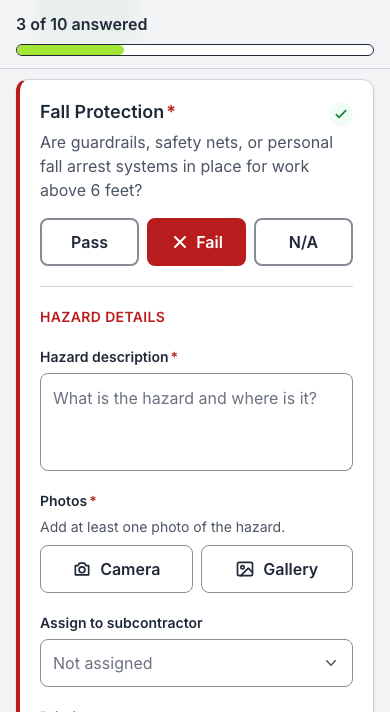
Walks the site with the Daily Site Safety Inspection on a phone, signal or not.
- Pick the site and answer each item: pass, fail or N/A.
- A failure asks for a note and a photo, then the responsible sub, the priority and the due date.
- Sign and submit. Each failed item becomes a corrective action for that sub.
- Report a hazard any time, with site, severity, a note and photos.
- See your own past inspections.
Subcontractor
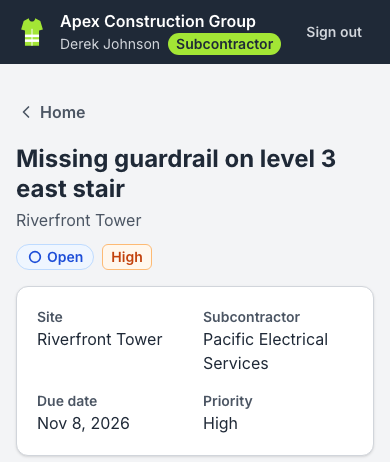
Gets a text or an email with a link straight to the task. No app store, no paid seat.
- Sign in with a phone number (a code by text) or an emailed link.
- Open the task from the text: the hazard note, photos, site and due date.
- Fix it, add after-photos and a note, and submit it for review.
- If it comes back, the reason is right there; fix rounds are kept newest first.
- Work for two general contractors with one login and a company switcher.
Safety manager
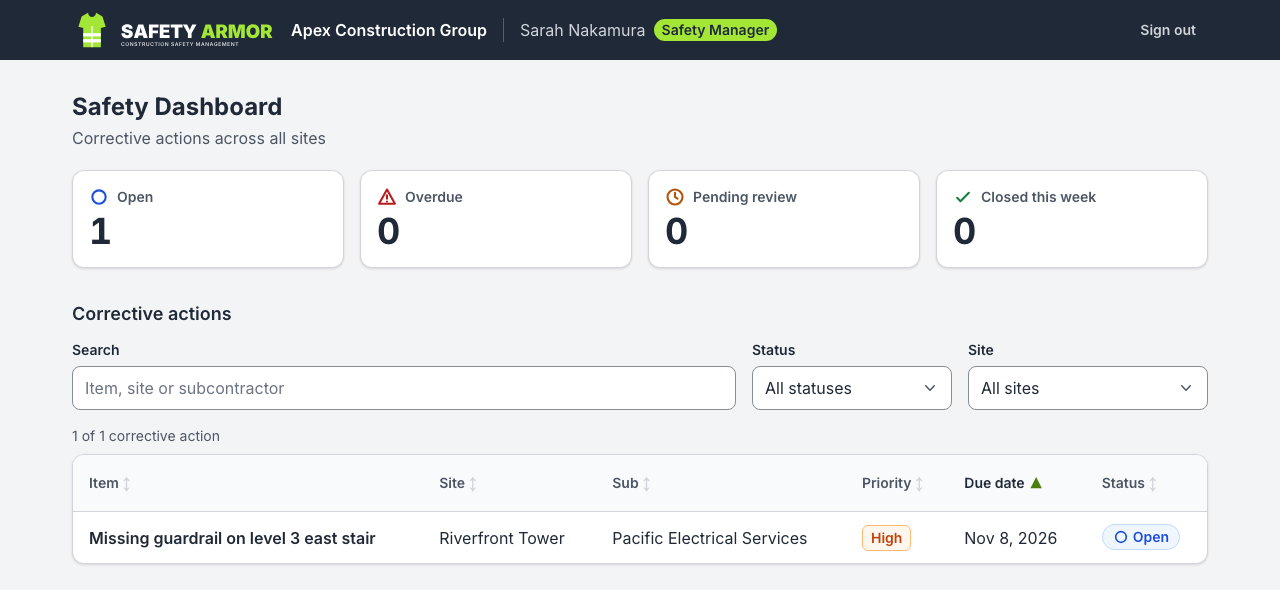
Sees every open hazard on one live dashboard and closes the loop with photo proof.
- Open, overdue, pending review and closed this week, by site, one tap from each list.
- Review before and after photos side by side.
- Close the item, or send it back with a required comment.
- Pick the cause when closing (one of 9 causal factors) and watch the top causes for the last 30 days.
- Export CSV or PDF for audits and owner reports.
Admin
Sets up people, sites, subcontractor firms and checklists for the company.
- Invite people by phone or email with a role and firm; they join with one tap.
- Deactivate someone and their access ends at once.
- Archive sites and firms instead of deleting them.
- Edit checklists: draft, publish, assign to sites; old inspections keep their version.
- See the audit trail of every change and every export.
- Maria Alvarez Today
- Dan Okafor Today
- Lee Brandt Yesterday
- Ana Ruiz Invited
How it works
The corrective action loop
Every failed item becomes a corrective action with an owner and a due date, and it stays open until a manager accepts photo proof of the fix.
-
Inspect.
A foreman or safety manager walks the site with a checklist on their phone. It works without a signal and syncs later.
-
Assign.
A failed item becomes a corrective action for the responsible subcontractor, with a due date.
-
Alert.
The sub gets a text or an email with a link straight to the task. No app to install, no account to buy.
-
Fix.
The sub uploads a photo of the fix. The manager approves it or sends it back.
-
See.
A live dashboard shows what is open, what is overdue and what keeps going wrong.
What happens to a corrective action
- Open Created from the failed item, with photos, priority and due date. The sub’s crew gets a text or an email. A reminder goes out the day before it’s due.
- Pending review The sub submits after-photos and a note. The manager sees before and after side by side.
- Sent back Not fixed yet? The manager sends it back with a required comment, and the crew is told again.
- Closed Accepted with photo proof and a recorded cause. Every step is in the audit trail: who and when.
All features
What’s in it today
Open any item for the detail. Everything here works in the app today; what’s next is on the roadmap.
Capture
Record what is on site, from the phone in your pocket.
Daily site safety inspection
Run the checklist on a phone: pass, fail or N/A per item, a required note and photo on a failure, then sign and submit. Checklists are versioned per site (draft, then publish), and old inspections keep the version they used.
Photos and signature
Hazard photos and the inspector’s signature are compressed on the phone before they upload, so they send on a weak signal.
Worker hazard reports
Foremen and subcontractor crew members can report a hazard with the site, severity, a note and photos, without an inspection. The manager reviews it or turns it into a corrective action in one tap.
Works without signal
Inspections, fixes and hazard reports save on the phone and send once when signal returns. On a weak signal, the phone’s saved copy of a page opens within about 3 seconds.
Location, asked once
The inspection records the phone’s location, asked once per session. If you decline, the inspection still saves.
Act
Turn every failed item into a task for the right crew, and make sure they hear about it.
Automatic corrective actions
One per failed item, assigned to the right subcontractor firm, saved all or nothing with the inspection.
Text alerts
A text with a link straight to the task. Texts need the person’s consent; STOP and HELP are handled, and a text carries only the app’s own link (links typed into a title are dropped).
Email alerts
Crew who aren’t texted get email: new, sent back and due tomorrow. Managers get a 7:00 AM daily summary. Every email has a one-click unsubscribe.
Due-tomorrow reminders
A reminder text at 8 AM the day before an item is due, once per item.
Fix and review
Rounds of fix photos, newest first, with the sub’s note and the reason it was sent back.
See
Know what is open, what is late and what keeps happening.
Live manager dashboard
Tappable tiles for open, overdue, pending review and closed this week; lists by site; sortable, filterable tables on desktop; large photo comparison.
Causal factor analysis
The manager records why a hazard happened when closing it; the dashboard shows the top causes for the last 30 days. Subcontractors never see causes.
Exports
CSV of corrective actions, inspections or answers by date, site and status; a PDF of an inspection or a corrective action with photos, signature and timeline. Managers and admins only, and every export is logged.
Audit trail
Every status change is recorded with who and when, and the record can’t be edited afterwards.
Trust & security
Your safety records stay yours, and the right people see the right things.
Passwordless sign-in
A text-message code, an emailed link, or Google. Invite-only: nobody gets in without an invitation from your company. No passwords, no seats.
Company isolation in the database
Each company’s data is separated, and subcontractors see only their own crew’s work, enforced by the database itself on every table. Changes go only through checked functions.
CAPTCHA on sign-in
A sign-in check stops automated abuse of the sign-in page.
Shared-phone friendly
Sign out clears what the phone saved for that person. Saved work stays with the person who signed in.
Tested and monitored
Every release is tested automatically, more than 1,600 automated tests across the database, the code and real phone and desktop browsers, and errors are tracked.
Readable in sunlight
High-contrast design, big tap targets, and it installs on the home screen like an app.
Offline
No signal? Keep working.
Basements, steel decks, rural sites. Safety Armor saves the work on the phone and sends it when signal comes back.
- No signal: the inspection, fix or hazard report is saved on the phone, and the header shows how many are waiting to send.
- Signal back: the phone sends them, oldest first, each one once.
- Confirmed: an item leaves the phone only after the server confirms it. One that’s refused stays, with Retry.
Try it: a pretend phone, nothing is sent.
Daily Site Safety Inspection
Ready. Start an inspection.
Put it in your crews’ pockets
Safety Armor is in an early-access pilot with general contractors. Ask for a walkthrough and we’ll show you the whole loop on your own sites.